

We often hear comments from e-commerce store operators using Shopify such as, "I'm torn about whether to switch to the latest theme" or "I don't even know what version my current theme is."
This article is a guide to help you understand the evolution of Shopify themes and the functional differences between versions, and to determine the appropriate timing for a store redesign.
Specifically, for those using older versions (Online Store 1.0) themes like Debut, and who are experiencing issues with limited functionality or app incompatibility, we will explain "which theme does what and what it cannot do" in an easy-to-understand manner.
With Shopify, updating your store every 2-3 years in line with version upgrades is key to increasing sales and improving operational efficiency.
1. Introduction: What is a Shopify theme?
A Shopify theme is a design template that can be used when building an online store on Shopify. It allows you to easily launch an e-commerce site without specialized knowledge, as you can edit colors, text, and design elements without coding.
Themes include free themes developed by Shopify officially and paid themes developed by Shopify partners, which can be purchased from the theme store.
Themes also undergo structural version upgrades every 2-3 years.
Version upgrades not only improve the user experience but also add new features that contribute to increased sales, so continuing to use an old theme can lead to significant lost opportunities in terms of performance and functionality.
This article will explain the history of Shopify themes from Vintage to Online Store 2.0 to Theme Blocks, and the features of each version.
2. Vintage: Features of the Debut era
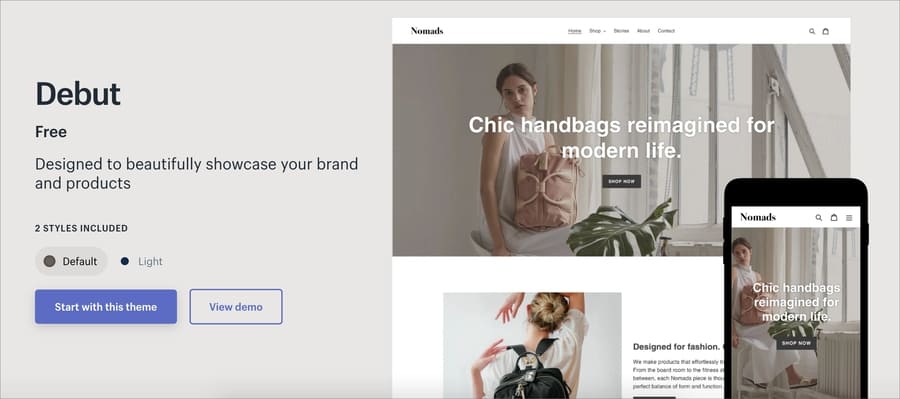
Vintage was one of Shopify's earliest themes. At that time, it was common to build a store by heavily customizing the free "Debut" theme or by purchasing a paid theme.
Features
- Shopify's standard template "Debut" was used by many stores.
- Adding, deleting, and reordering sections were only supported on the homepage.
- Code customization was often required, making it difficult for non-engineers to use.
- Inflexible editing on product and collection pages.
- Low reusability between themes.
The "Debut" theme is now deprecated and has been removed from the theme store.
3. Online Store 2.0: Evolution in the Dawn era

As someone involved in building Shopify stores, it felt like it finally addressed the pain points that couldn't be reached in the Debut era.
Dawn and Rise, which are now standard, were built with Online Store 2.0, and most current popular paid themes are also Online Store 2.0.
The evolution from Theme 1.0 to Theme 2.0 added various features that are now essential.
Key new features
- Sections can be added to all pages (Sections Everywhere)
- Enhanced metafield functionality
- Creation of rich sections using dynamic sections
- Modularization of theme structure using JSON templates
- Speed optimization through lightweight Liquid code
- Improved compatibility with Online Store 2.0-compatible apps
Benefits in actual operation
- Developers no longer needed for simple design changes
- A/B testing and LP improvements can be implemented quickly
- Easier to convey brand value
4. Theme Blocks (equivalent to Online Store 2.5): Towards the Horizon era

The new "Horizon" theme, introduced in Shopify Editions Summer '25, is the first theme created based on theme blocks. While the new AI block generation feature initially caught attention, its true essence lies in the theme's structure.
If you look at the footer section's structure from the customization screen, you'll notice a significant difference from before.

Because it is built on theme blocks, which can be reused anywhere in the theme and have a nested structure, the freedom of customization without code is incomparable to previous versions.
Features of Horizon
- Created based on theme blocks
- Allows detailed editing without code
- Nested block structure further improves app integration
- AI-powered block generation is possible
While "Horizon" is a very innovative theme, it's important to note that it only supports "new customer accounts" and does not support "classic customer accounts."
▼You can find more information about Horizon in these articles
We actually used and verified the AI block generation feature, one of the key features of the new Horizon theme, and summarized its advantages and future challenges.

We thoroughly explained the features of the new Horizon theme and its various premium-level functions.
5. Summary of comparison by version
| Feature / Version | Online Store 1.0 (Debut) | Online Store 2.0 (Dawn) | Theme Blocks (Horizon) |
|---|---|---|---|
| Section support | Homepage only | All pages | All pages + improved customizability |
| Metafields | Limited | Enhanced/Linkable | Advanced linking possible |
| AI block generation | Not possible | Not possible | Possible (English only) * |
| No-code development difficulty | High | Medium | Low |
| Extensibility | Low | Medium to High | High |
*As of August 2025
6. "Theme renewal timing" that store operators should know
Shopify themes undergo major updates every 2-3 years, and the capabilities differ significantly between versions.
Why is renewal necessary?
- New features directly impacting customer acquisition and conversion rate improvement are added
- Older themes may hit a ceiling in terms of appeal, operational efficiency, and SEO
- Old themes risk app compatibility issues and end-of-support
- Migrating to the latest theme improves flexibility, speed, and UX
Concrete action plan
- Check the theme in use from the theme editing screen or theme.liquid
- Consider migrating to Online Store 2.0 or later if not Dawn-based
- Use the latest theme to redesign the customer experience
- If considering Horizon, try it out first
7. Conclusion: Optimize your e-commerce experience in line with theme evolution
Shopify themes are not merely design templates; they are crucial business infrastructure that influences sales. Now, especially with significant improvements expected from theme updates, is an excellent time for a store redesign.
If you are considering a Shopify store redesign or are interested in the new Horizon theme, please feel free to contact Commerce Media!
も見てみる


